Embarrassingly parallel and DAG workflows for science in Python
A review of existing frameworks, some tips and a decision chart.
You have a script that runs for 3 hours on your laptop, and you know it could run in 10 minutes on the 64 cores of the lab workstation (or on the cluster down the hall). This post is about getting there without spending a week writing the plumbing yourself.
1. Code as a graph
Let's be honest, if you are writing code for scientific purposes and it is a few hundred lines long, there is a high chance that you are applying a function inside a loop, and the overall code will essentially consist in loading your data, chaining computations, and exporting the results.
The chain of computation can most of the time be represented as a directed acyclic graph (or DAG) 1. A loose definition of a DAG would be: there is a beginning and an end, and you are not going back or doing cycles. It turns out that this is the case of most scientific code, where there are often clear inputs and outputs. An example:
def step1(in_data):
    ...
    return step1_out

def step2(in_data, step1_out):
    ...
    return step2_out

def step3(in_data, step2_out):
    ...
    return step3_out

def step4(step2_out, step3_out):
    ...
    return step4_out

if __name__ == "__main__":
    in_data = ...  # load (aka step0)
    out1 = step1(in_data)
    out2 = step2(in_data, out1)
    out3 = step3(in_data, out2)
    out4 = step4(out2, out3)
This could be described as the following graph:
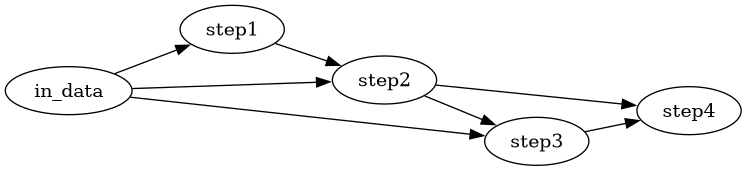
Once you look at your code this way, the parallelism becomes obvious: any two nodes that don't depend on each other can run at the same time. In the example above there is none (it's a chain with shortcuts), but add a loop around it and things get interesting.
2. Embarrassingly parallel
The most common case is the embarrassingly parallel one: you apply the same function to many independent inputs, and nothing needs to be communicated between them. Think "reconstruct every subject", "run every hyper-parameter of the grid", "process every slice". It is called embarrassing because there is no clever trick needed, the hard part is only the plumbing.
Let's take a slightly more realistic example, which I will reuse for each framework below. We have a bunch of subjects, a few reconstruction methods to compare, and we want a summary table at the end:
def load(subject):
    ...
    return kspace, reference

def reconstruct(kspace, method):
    ...
    return image

def evaluate(image, reference):
    ...
    return score

def aggregate(scores):
    ...
    return table

if __name__ == "__main__":
    scores = {}
    for subject in subjects:
        kspace, reference = load(subject)
        for method in methods:
            image = reconstruct(kspace, method)
            scores[subject, method] = evaluate(image, reference)
    table = aggregate(scores)
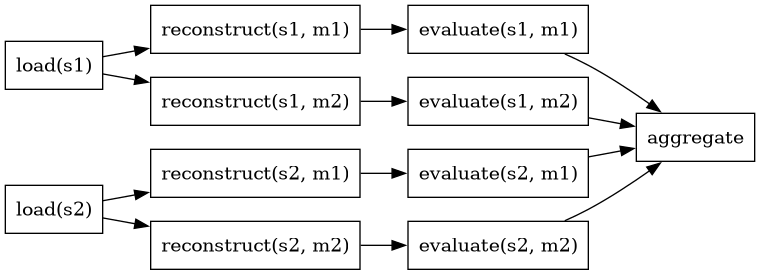
Every (subject, method) branch is independent, only aggregate needs to wait for everyone. Note that load is shared between branches: this is where a plain "parallel for loop" starts to show its limits (either you load the data once per method, or you split your script in two stages).
3. Existing frameworks and libraries
There is a hell of a lot of workflow engines out there, and even restricting to Python, it's still a lot: https://github.com/topics/workflow-engine?l=python returns 85 results at the time of writing.
Yet, I would like to talk more about what is used by number-crunchers/data-scientists around me. I am leaving out the "data engineering" ones (Airflow, Prefect, Luigi, Dagster…) that are designed to run the same pipeline every night on a server, not a one-shot experiment on a cluster.
3.1. Python Stdlib: multiprocessing, concurrent.futures
Python already ships with everything needed to run things in parallel on a single machine. Because of the GIL2, you want processes, not threads, for anything CPU bound in pure Python (threads are sometimes fine if the heavy lifting happens in numpy/torch, which release the GIL).
concurrent.futures is the modern and nicer API, multiprocessing.Pool does essentially the same thing:
from concurrent.futures import ProcessPoolExecutor
from itertools import product

def run_one(subject, method):
    kspace, reference = load(subject)
    return evaluate(reconstruct(kspace, method), reference)

if __name__ == "__main__":
    tasks = list(product(subjects, methods))
    with ProcessPoolExecutor(max_workers=8) as executor:
        results = executor.map(run_one, *zip(*tasks))
    table = aggregate(dict(zip(tasks, results)))
It works, it has no dependencies, but:
- Everything sent to a worker must be pickled: no lambdas, no functions defined in the
__main__of a notebook, and large arrays are copied back and forth. - The
if __name__ ="main":= guard is mandatory, as workers will re-import your script (this is the default on macOS and Windows, and on Linux since Python 3.14). - There is no notion of dependency: if you want a DAG, you have to call
.result()on futures yourself, in the right order.
3.2. Joblib
Joblib is the "just make my for loop parallel" library, and it does it very well. Also it is maintained by colleagues of mines, notably Thomas Moreau.
from joblib import Parallel, delayed

results = Parallel(n_jobs=-1)(
    delayed(run_one)(subject, method) for subject, method in tasks
)
Compared to the stdlib, you get for free:
- A more robust pickling (via
cloudpickle, so it works in notebooks) and memory-mapping of large numpy arrays instead of copying them. - Sane limits on the number of BLAS/OpenMP threads in each worker, so that 64 workers don't each spawn 64 threads.
joblib.Memory, a disk cache that skips a function call if it has already been computed with the same arguments. For long experiments it's a life-saver.
It has no DAG support, and stays on one machine (unless you plug the Dask or Ray backend, see below).
3.3. Scikit-Learn
Not a workflow engine per se, but worth mentioning because a lot of people use it without knowing: every n_jobs parameter in scikit-learn (GridSearchCV, cross_validate, random forests…) is joblib under the hood. If your "experiment" is a hyper-parameter search on an estimator, you may not need anything else. And with joblib.parallel_config(backend"dask")= the same code can run on a cluster.
3.4. Submitit
Submitit is a small library to send Python functions as SLURM jobs, and get the results back as Python objects. No bash scripts, no sbatch, no parsing of output files.
import submitit

executor = submitit.AutoExecutor(folder="logs/%j")
executor.update_parameters(
    timeout_min=60, cpus_per_task=4, gpus_per_node=1,
    slurm_partition="gpu", slurm_array_parallelism=32,
)
jobs = executor.map_array(run_one, *zip(*tasks))  # a single SLURM job array
results = [job.result() for job in jobs]
What I like about it:
map_arraysubmits a SLURM job array, which is what your cluster admins would like you to do (instead of 1000 separate jobs).- Logs, pickled inputs and outputs of each job end up in the
folder, so it's easy to see what went wrong. AutoExecutor(cluster"debug")= runs everything in the current process, so you can put a breakpoint in your function before sending it to the cluster.
It has no DAG support either: each job is independent. You can chain stages manually (wait for the first array, then submit the second), which is often good enough.
3.5. Dask
Dask is the first one of this list that really thinks in graphs. With dask.delayed, you write your code as usual, but each call returns a lazy object instead of a result, and dask builds the DAG for you:
import dask

scores = {}
for subject in subjects:
    kspace, reference = dask.delayed(load, nout=2)(subject)  # loaded once per subject
    for method in methods:
        image = dask.delayed(reconstruct)(kspace, method)
        scores[subject, method] = dask.delayed(evaluate)(image, reference)
table = dask.delayed(aggregate)(scores)

table.visualize("dag.png")  # optional, requires graphviz
result = table.compute()
This is exactly the DAG drawn above, including the shared load. By default it runs on local threads/processes; add a dask.distributed.Client and you get a (very useful) live dashboard. With dask-jobqueue, the workers are SLURM jobs:
from dask.distributed import Client
from dask_jobqueue import SLURMCluster

cluster = SLURMCluster(cores=8, memory="32GB", walltime="02:00:00")
cluster.scale(jobs=10)
client = Client(cluster)  # everything computed from now on runs on the cluster
The downsides: debugging a failure inside a distributed worker is less pleasant than a plain traceback, and the scheduler has some overhead, so tasks should last at least a second or so. Dask is also a lot more than delayed (arrays, dataframes), which you may or may not need.
3.6. Ray
Ray comes from the ML world and is the big one of this list. The API is similar to dask's delayed: decorate a function with @ray.remote, call it with .remote(), and you get a reference to a future result, that you can pass to other remote functions to build the DAG:
import ray

ray.init()

load_r = ray.remote(num_returns=2)(load)
reconstruct_r = ray.remote(num_gpus=1)(reconstruct)
evaluate_r = ray.remote(evaluate)

refs = {}
for subject in subjects:
    kspace, reference = load_r.remote(subject)
    for method in methods:
        image = reconstruct_r.remote(kspace, method)
        refs[subject, method] = evaluate_r.remote(image, reference)
table = aggregate(dict(zip(refs, ray.get(list(refs.values())))))
Its strong points are the resource-aware scheduling (num_gpus=1 and Ray makes sure only one task per GPU runs at a time), a shared-memory object store that avoids copying large arrays, and a whole ecosystem on top (Ray Tune for hyper-parameter search, Ray Train…). The downside is that it is heavy, and running it on a SLURM cluster means starting a Ray head node and workers yourself inside an allocation, which is not really a one-liner.
3.7. Pydra / Nipype
If you work in neuroimaging, you have probably met Nipype, which wraps FSL, SPM, ANTs, FreeSurfer and co. into Python and chains them in workflows. Pydra is its successor, rewritten as a general purpose dataflow engine. I won't show code here, as its API changed quite a lot recently, but the key ideas are worth knowing:
- Each task output is cached on disk, indexed by a hash of its inputs: re-running a workflow only recomputes what changed.
- Splitters and combiners express the "for each subject, for each method" loops declaratively, and the combine step is our
aggregate. - The same workflow can run with a local, SLURM, SGE or Dask worker.
It's the most complete of the list for our use case, but also the steepest learning curve. If your pipeline is mostly calling existing neuroimaging tools, go for it. For pure Python number-crunching, dask is probably enough.
4. TLDR
| Framework/Library | Multiprocess | Multi-Machine | Ease of use | Supports DAG | Comments |
|---|---|---|---|---|---|
| multiprocessing | yes | no | ++ | no | stdlib, pickling pitfalls |
| concurrent.futures | yes | no | ++ | manually | stdlib, nicer API than multiprocessing |
| Joblib | yes | with dask/ray | no | disk caching with Memory, sane thread limits |
|
| Scikit-Learn | yes | with dask/ray | no | n_jobs is joblib under the hood |
|
| submitit | via SLURM | yes (SLURM) | ++ | no (by stages) | job arrays, logs per job, local debug mode |
| Dask | yes | yes (jobqueue) | + | yes | dashboard, delayed builds the DAG for you |
| Ray | yes | yes (not on SLURM) | + | yes | GPU-aware scheduling, heavy |
| Pydra/Nipype | yes | yes | - | yes | caching by input hash, neuroimaging oriented |
5. Decision chart
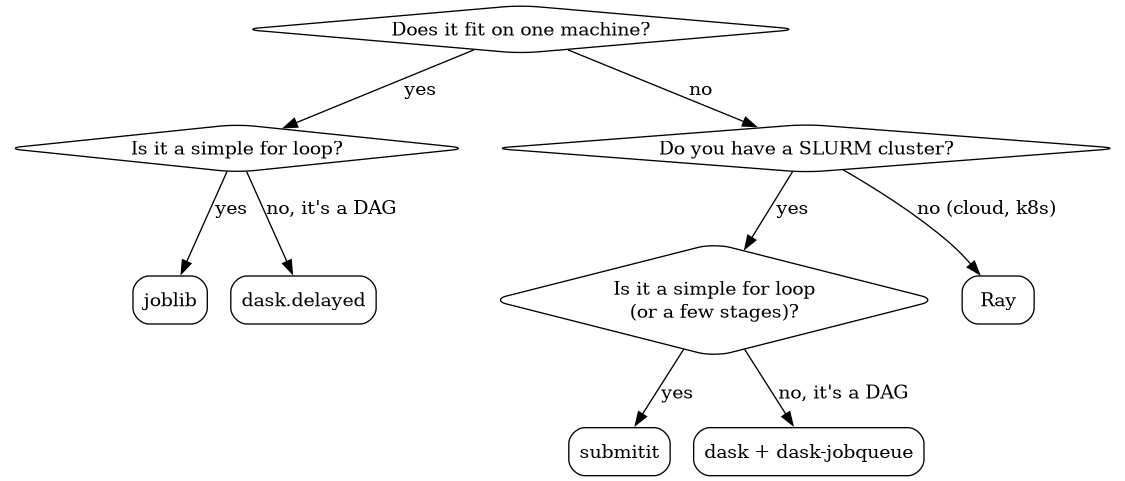
Figure 1: fortunately, this is a DAG as well !
And if your pipeline is a chain of neuroimaging tools, skip the chart and use Pydra/Nipype.
6. Some tips
- Don't reinvent the wheel: a
ProcessPoolExecutor+ a fewsbatchscripts + a file tracking what is done is exactly how every homemade workflow engine starts. Use one of the above instead. - Make every task a function of its inputs only (including the random seed!). Then it can run anywhere, in any order, and be re-run safely.
- It's okay to write to the disk. Disk speeds are now very fast, disk space is much cheaper than RAM. Files are everywhere, so their access is quite optimized. Bonus: if each task writes its own result file and skips the work when it already exists, a crashed or timed-out run can simply be restarted.
- Concurrent writes are the root of 95% of errors, so avoid them. Instead, each task writes in a separate place, and a last step combines everything (that's the
aggregateof our example). - Watch out for oversubscription: numpy and torch already use all your cores. 8 processes each using 64 threads will be slower than a single one. Set
OMP_NUM_THREADS(or let joblib do it for you). - Don't make your tasks too small: each task has an overhead (pickling, scheduling, starting a SLURM job…). A few seconds per task at least for local pools, a few minutes for SLURM jobs. Group small tasks together if needed.
- Always debug in serial first (
n_jobs=1,cluster"debug", =dask.config.set(scheduler"synchronous")=). A traceback from a remote worker is never as nice as a local one.
7. Conclusion
There are 3. Concurrent write error\n three common bugs:
- Syntax Error
- Off-By-One Eror
For most of the scientific code I have seen (and written), joblib on a workstation and submitit on the cluster cover 90% of the needs. When the stages start to depend on each other in non-trivial ways and you catch yourself writing a scheduler, it's time to switch to dask. Ray and Pydra are great, but only if you need what they bring (GPU scheduling, neuroimaging tools, input-hash caching).
If your favorite framework is missing, just tell me.
Footnotes:
The Global Interpreter Lock, which is slowly going away since https://peps.python.org/pep-703/, but your dependencies are probably not ready yet.